I have been a computer science student for about as long as I’ve been blogging about laptops – I’m close to finishing my 2nd year. In that time, I’ve seen what laptops suit this course the best. Sadly, I bought my laptop before the course started and in a way, I’ve made some mistakes in my judgment – but I’m here to make sure you don’t make them.
August 2017 update. I’ll go in-depth on what type of laptop you should be looking for and at the end, I’ll give a few of top-notch suggestions that I’d pick if I’d be buying a laptop today.
Without further ado, let’s dive in.
So what are we looking for?
Major requirement Powerful processor
As a computer science student, you’ll probably have to code in several languages:
Java
Some scripting language (PHP/Python/Ruby)
Some functional/logic language (Prolog/Haskell)
Likely some C/C++/Objective-C
In all of these cases, your laptop performance will not limit the execution of your code. Yes, it might take a second longer to compile or 5 seconds longer to start a Java server but that’s not a good enough reason to stretch your budget for a better processor.
Even though a basic mid-range 2 core processor should suffice when compiling your code. So why am I edging you towards a fast processor? There’s one important reason on why you should aim for a higher-end CPU if possible. Responsive and snappy workflow actually makes you a better and a happier programmer.
If you're looking for a great way to document your adventures, you can't go wrong with a GoPro. But, capturing footage of your exploits is only half the fun. To relive and share those incredible moments with your loved ones, you need to edit your videos. With so many video editing software options, which one should you choose? More importantly, which laptop would give you the best experience for GoPro video editing?
Choosing a laptop for Adobe Lightroom is not particularly hard – having a high-end graphics card is not necessary, laptops with larger and faster hard drives and memory are now commonplace. But it gets problematic when you have to take into consideration screen and upgrade potential.
Surely no sane man would go through all new, well-received and best selling laptops to find out what is the best one for Lightroom. But you’d be making a mistake if you call me sane.
So I compiled a list of 244 laptops (most of them are outdated, but they are always down in the list when comparing metrics). Then I compared them to their performance (using real benchmarks), storage, screen quality and weight. I have weighed all of these metrics according to what’s important to Lightroom – so you know these laptops are the best for their purpose.
In this post I’ll cover 8 best laptops for Lightroom and what’s so great AND what’s not so perfect about them. Also, I will make sure that anything above budget options will also be a viable option for other software you might end up using (khm khm.. Photoshop).
This time, unlike any other, I’ll start off with the laptops and then I’ll write about how did I end up choosing them. Finally, at the bottom of the article, I’ll give you the link to the spreadsheet covering all the quantified comparisons of these 240 laptops ranging from $370 to $3700!
The upside of Revit is that it doesn’t require a powerful graphics card and that makes Revit a lot more suitable for laptops. Knowing that I’m going to guide you through the requirements for a good Revit notebook and my picks for the best laptop for Revit.
2018 June 3rd update. Updated CPU, GPU write-ups, replaced all laptops and updated the spreadsheet!
What are we looking for?
I’m very glad that Autodesk put in the effort to outline various levels of Revit hardware/software requirements instead of just putting up a list of minimal requirements. This allows us to understand which parts scale better than others and where we should put our focus on.
Major Requirements for the best Revit laptop
Processor
Autodesk makes it very clear that the processor should be #1 priority:
“Highest affordable CPU speed rating recommended.” – Autodesk
Unlike other visual software (AutoCAD, Solidworks etc.), Revit does not need a powerful graphics card for rendering the drawings.
So what do I recommend?
For an entry model under 950$ – a higher-end Intel Core i5 model is a necessity. Anything above that should have a 5th-7th generation “i7” processor. In some rare cases (covered at the end of the guide), there are laptops under $900, that come with a fast i7 H-series CPUs.
Exact models, I am talking about are:
Intel Core i7-7700HQ, i5-8300H, i7-8750H or equivalent for 950$+ models
Intel Core i5-7300HQ, i7-7500U, i5-8250U for anything under 950$
Memory
As per usual, 8 GB of RAM should be your starting point and 16 GB is the magic spot where you don’t have to worry about the memory (for the most part).
Right now, 1000$ is a good line to draw for what amount of memory is acceptable. Any laptop under 1000$ can have 8 GB of RAM and anything over that must come with 16 GB on board.
It does not matter much whether memory is DDR3/DDR4.
Solid State Drive
For Point Cloud interactions, it is required to have either a 10,000+ RPM hard drive or a SSD. Since laptops don’t come with HDDs over 7,200 RPM, that leaves us with only 1 option – a Solid State Drive. SSDs have fallen dramatically in price and apart from budget laptops – should be a part of any Revit laptop.
Now you need to draw a line on how much storage you need – 250, 500, 1000 GB? Most likely, something like 250/500 SSD + 1 TB HDD is enough. In that case, your OS, Revit, and projects you’re working on should stay on the SSD while older projects and general media can be moved to a spacious HDD.
There are some well-rounded laptops that don’t come with an installed SSD. In that unfortunate case, I recommend keeping 100$-200$ extra for 250/500 GB SSD (I’ve had the best experience with Samsung drives, but there’s plenty of good brands to choose from).
Minor Requirements for the best laptop for Revit
We’ve got down our 3 major requirements – processor, memory, and storage. Now any leftover budget should go towards making sure it lasts long, it has a great screen to look at and it can perform well when using other professional software apart from Revit.
Screen
You’ll be looking at it throughout the day (and once in a while – throughout the night), so we might as well make sure it looks good.
A good screen is essential in 3 simple ways:
it allows working during bright sunlight without straining your eyes
it helps you see your work as it should be seen (as it will be in real life and how your clients will see it)
it makes your work a bit enjoyable
Every screen can be broken down by its resolution, contrast, brightness and color gamut.
When talking about the resolution – go for Full HD (1920×1080). There’s not much reason to go above Full HD, especially when Revit developers do not recommend going above 150% DPI scaling. That simply means, that fonts and buttons in Revit will not scale properly at high resolutions.
Contrast should be 800:1 or more, average brightness should be 280 cd/m or more (which is ~20 cd less than usually advertised maximum brightness). Good contrast and brightness are mostly important when working outside or near a bright window.
Finally, color space/gamut is not usually mentioned with other specifications but some reviewers measure it. In that case, 90%+ sRGB coverage and 60%+ Adobe RGB coverage indicate a wide color space. That means that the screen can produce vivid colors. In some cases, you might need to manually calibrate the screen to minimize its color bias – tendency to be a bit too blue/green or red.
Searching for the best laptop for streaming can be very problematic as it requires comparing benchmarks and reading a lot of reviews. When you consider that even the best laptops will get some negative responses, it’s borderline impossible to find a universally acclaimed model.
A quick sidenote on what type of streaming I refer to
This post is not about watching Netflix, Youtube, Hulu, HBO or anything else of that matter.
Don’t get me wrong – every laptop I’ll recommend is easily more than enough for this type of streaming. But this post is for you if you want to stream video to other people – likely on Twitch via apps like OBS. This includes gameplay, gaming talk shows and streaming creative work.
But since you’re already here and you simply want to stream movies/clips – the following laptops will be way too good (and way too expensive) for just that. For basic streaming over Netflix, HBO Now, Youtube there are 3 basic models.
Solidworks can be very demanding even for a dedicated PC. That makes it problematic if you want to keep your budget low. Also, Solidworks is designed to take advantage of professional CAD graphics cards which introduce even more variables when looking for a proper laptop. Despite this, I’ve decided to take up the challenge to find the best laptop for Solidworks even if you have to keep your spending tight! So without further ado, let’s jump right in..
I have written a few posts on choosing a laptop for producing music and AutoCAD. These are just some of my hobbies and whenever I buy a new laptop – I make sure it suits them.
Meanwhile, programming is more than just a hobby to me – it’s my primary job. I have been working mostly on my laptop for the past 5 years and I take my time when upgrading my hardware. That’s why I didn’t want to rush out a guide for best developer laptop.
In this post, I’ll guide you through my train of thought while looking for the best programming laptop, which developer laptops I recommend and why.
What is your coding lifestyle?
Before you proceed, you should evaluate how you see yourself using this laptop.
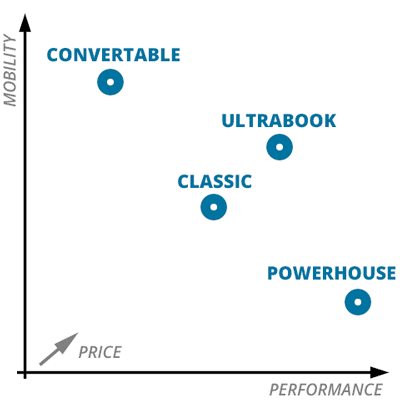
Here’s a little graph I made for locating what laptop category should match your needs.
When you think about it, an ultrabook isjust a better and more expensive version of “regular” laptop.
Programming laptop comes down to two key requirements – performance and mobility. If you need only one of them – congratulations – you’re in the clear! There’s quite a few great programming laptops if you don’t try to “have it all”. But if you need performance and portability – well… finding the best one won’t be easy, especially if you’re on a tight budget (under 1300$).
Powerhouse – Performance is everything
Convertible/hybrid/2-in-1 – Flexibility is my top priority
Classic laptop – Balanced laptop with great value
Ultrabook – I’ll pay extra for the best of both worlds
For example, laptop for me is my main workstation. That’s why I prefer having superb performance (so no convertibles and regular laptops). I also lean towards having a lot of screen space for multiple windows and I don’t mind adding 1-2 pounds of weight if that gives me significant performance boost (so no ultrabooks). Finally, I live/work in 3 different cities throughout the year and having a dedicated external monitor setup for each place just isn’t practical. That’s why I have 17.3″ laptop though 15.6″ laptop wouldn’t too bad if it had enough juice in it.
From my experience, a laptop for programming depends on what kind of a developer you are:
Coding on a laptop – bulky and powerful laptop (15″ – 17″)
Coding on a dedicated PC/Mac – ultrabook for coding on the go (13″ – 15″)
Recently, I was searching for a hackintosh laptop – I wanted to learn making iPhone apps (and Swift seemed as a neat programming language).
I already had tried out Mac OS X using virtualization. It seemed just the right time to upgrade my laptop anyways and the idea of a hackintosh captivated me. And I didn’t want just any laptop – I wanted the best hackintosh laptop within my budget.
When searching for the hackintosh compatible laptops, the most irritating bit is that most recommendations and lists are polluted with outdated and discontinued laptops or notebooks that often cost even more than the MacBook itself. The lists I found were full of loose ends with little help on what to do beyond the purchase.
And there’s a reason for it – it is hard to compile a list of recent laptops and it is even harder to find all the resources required to kick-start this usually exhaustive laptop transformation.
That’s why I ended up writing this guide. I quickly weeded out the laptops with a set of strict criteria. All laptops I’m going to recommend:
have 4-th and 5-th gen processors (Haswell and Broadwell)
are compatible with OS X Yosemite
are still in the market
are cheaper than MacBooks themselves or equivalent (at the time of writing all are under $1,000)
have step-by-step guides specific for their EXACT models or at the very least for their type of laptop with people known to have successfully used them
have alive forum threads with people who were/are in your current situation
Since most of the laptops I have selected are rather new in the hackbook market – there are risks involved.
So here goes a word of caution!
This is not a list for best hackintosh laptops off ALL TIME. Yes, there are a few a lot more compatible laptops from 2010 – 2012 era but this list is not for that. There are enough guides about these old computers anyways.
I’ll focus on laptops with either good documentation or laptops that are more welcoming to OS X and in result require less manual work to work properly.
There is no perfect laptop for hackintoshing. If you’re building your own tower PC, you can get “golden builds” – a set of parts with either no or minimal issues when installing OS X. In the laptop world – forget about it.
Do not expect that it will install easily and without any problems. You can pray that it will, but do not expect it. If you want 100% compatibility – buy a MacBook.
I’m also here to get you ready for the journey by showing you the best path to a hackbook that was already proven by other people.
If you’re new, you’ll be pleasantly surpised by the hackintosh community. There are many hubs where these wonderful people gather. In this post you’ll see quite a few links to TonyMacx86 since there you can find most guides to laptop hackintoshing.
Isn’t lion the best? I know, right?
But no matter how amazing this community is – you’ll have to solve the technical problems by yourself at the end (or maybe your tech friend).
OK, I’ve got it. What now?
Well, I’ll start off from the key requirements for your new PC/MacBook hybrid, the common difficulties and finally – an EXACT list of laptops that you should consider.
This week I’ve got a massive post on picking a laptop for FL Studio (and in most ways – music production in general).
In this post I’m going to list out what are the specific requirements we’re targeting for, which laptops meet them for every price range and what you should do after getting a laptop. Time to find out what is the best laptop for FL Studio!
Without further ado.
2018 June update. Last month Image Line released FL Studio 20 so I’ve decided to do an update on recommended laptops for FL Studio including the best laptops available in 2018 Summer and beyond.
2 Ghz Intel Pentium 4 / AMD Athlon 64 (or later) compatible CPU with full SSE2 support
WINDOWS 7 or later / macOS 10.11 or later
4 GB or more RAM recommended
4 GB free disk space
Soundcard with DirectSound drivers. ASIO/ASIO2 compatible required for audio recording
Looking at these requirements it seems that any recently released laptop would be more than enough. Well… yes and no. It might be enough to launch FL Studio but it is far from what you need if you’re using VSTs and sample libraries. Apparently some known plugin libraries have significantly higher requirements than FL Studio itself.
So do these requirements actually say anything?
I’d argue that the only thing that you should take from these requirements is that video card doesn’t matter at all and hard drive space matters only if you have an extensive sample library.
Every student has different needs and requirements for a laptop. Some may need a quickly booting notebook for their basic school tasks while others will sacrifice the all-day battery for more muscle under laptop’s lid. But even with this wide range of demands some laptops shine through as being more suited for fellow students than the rest. I split laptops in 3 groups: budget, portable laptops and gaming machines. No matter if you’re a high school freshman or a senior – you’ll find a great option here.
 I have been a computer science student for about as long as I’ve been blogging about laptops – I’m close to finishing my 2nd year. In that time, I’ve seen what laptops suit this course the best. Sadly, I bought my laptop before the course started and in a way, I’ve made some mistakes in my judgment – but I’m here to make sure you don’t make them.

 The upside of Revit is that it doesn’t require a powerful graphics card and that makes Revit a lot more suitable for laptops. Knowing that I’m going to guide you through the requirements for a good Revit notebook and my picks for the best laptop for Revit.